Sub-Accounts
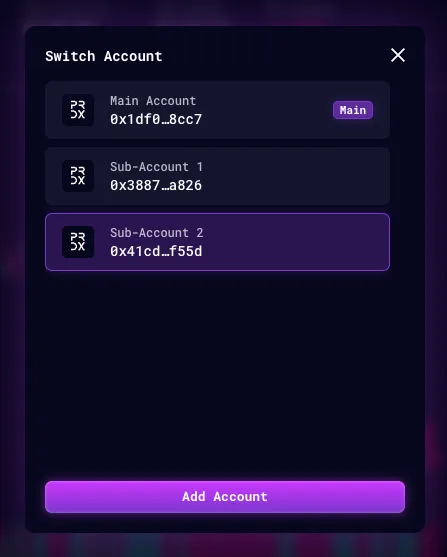
Users could create a Sub-Accounts with a separate L2 Wallet Address that linked to a main account. The sub-account has all the same functionality as a main account.
Why use a Sub-Account?
Users could create a Sub-Account to trade on a separate account so that:
- Positions could be managed separately
- Margin is shielded from the main account and other accounts
- Liquidation will not affect the collateral kept in other accounts.
How to create a sub-account
Your main account must be deployed before you can create a sub-account. A new account is deployed by its first deposit, so fund the main account first. Via the API, creating a sub-account or isolated market account under a main account that is not yet deployed fails with 400 INVALID_PARENT_ACCOUNT. See Account deployment.
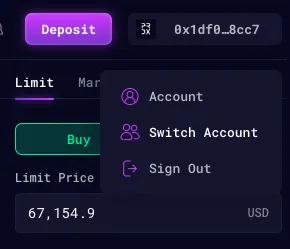
Step 1: Under the ‘Account’ button on the top right corner, click on ‘Switch Account’.
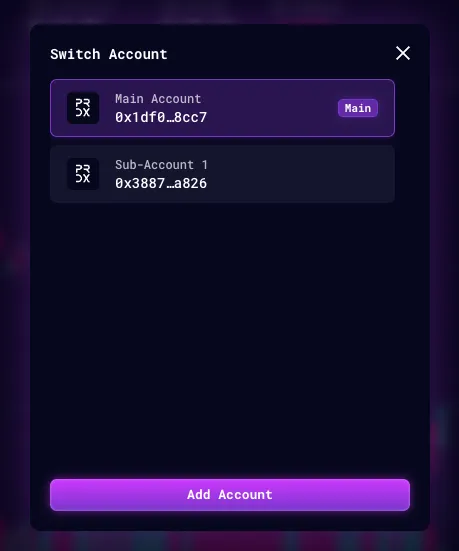
Step 2: On the ‘Switch Account’ pop-up, click on ‘Add Account’.
Step 3: Click on the newly created Sub-Account to enter it.