For AI agents: a documentation index is available at the root level at /llms.txt and /llms-full.txt. Append /llms.txt to any URL for a page-level index, or .md for the markdown version of any page.
Logo
Join CommunityStart Trading
HomeOverviewDIME UtilityTradingRisk & LiquidationsVTFsParadex ChainEcosystemREST APIWebSocket APIAgentic AI HubRelease Notes
  • Getting Started
    • What is Paradex?
    • Roadmap
    • DIME Utility
    • Bridges and On-Ramps
    • Official Links
    • Architecture Overview
  • XP & Referrals
    • Xperience Points
    • Affiliate & Referrals
  • Accounts
    • Wallet Overview
    • Wallet Integration
    • Sub-accounts
    • Transfers
    • Mobile Access Guide
    • Maintenance & Releases
    • Testnet FAQs
Join CommunityStart Trading
On this page
  • Via App UI
  • Via API
Accounts

Transfers

Transferring funds from one Paradex Address to another.
Was this page helpful?
Edit this page
Previous

Mobile Access Guide

Paradex offers two ways to access the platform on your mobile device.
Next
Built with

Via App UI

  • Step 1: Head over to https://app.paradex.trade/portfolio
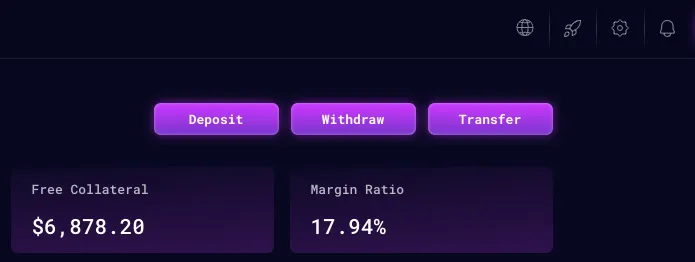
  • Step 2: Click on the ‘Transfer’ button on the top right of the portfolio page.
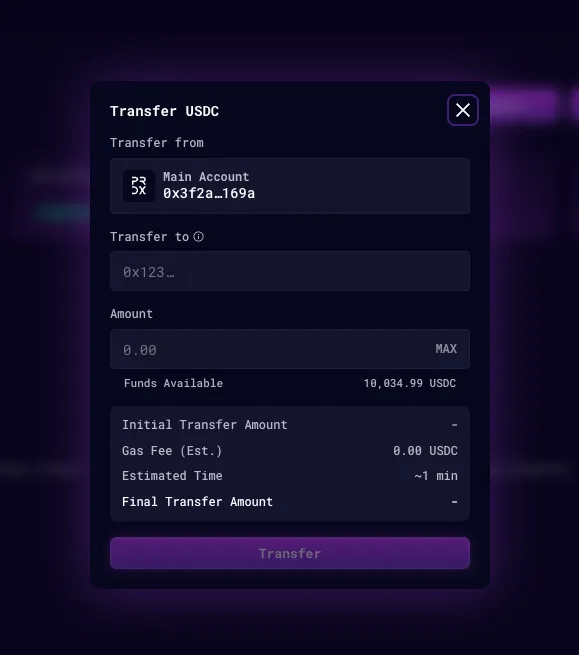
  • Step 3: In the ‘Transfer to’ field, key in the Paradex Address that you would like to send USDC to.
  • Step 4: Enter the Amount
  • Step 5: Transfer!
Use the 'Transfer' button on the top-right hand corner of the Portfolio Page
Transfer your USDC to a different Paradex L2 Address

Via API

Should for any reason you need to transfer funds from your current Paradex Wallet to a different Paradex Wallet via API, you are also able to leverage Starknet APIs do this. Feel free to use this script to do so or as a reference should you want to build your own.